
Allow us to Create Custom Real Time Widgets that are available for selected users on the dashboard in Admin screen or in the portal screen.
The widgets are customizable views that can provide the user or administrator with real-time information on the selected activity.
To add a widget you need to :
- Create the widget - see below
- Go to to Users and edit the user where the widget should be added
- Login to the portal with the user and the widget will automatically be in the dashboard populated with current data
-
New Widget :
Clicking on the “+New” button will refer you to the page where you can create a new Environment
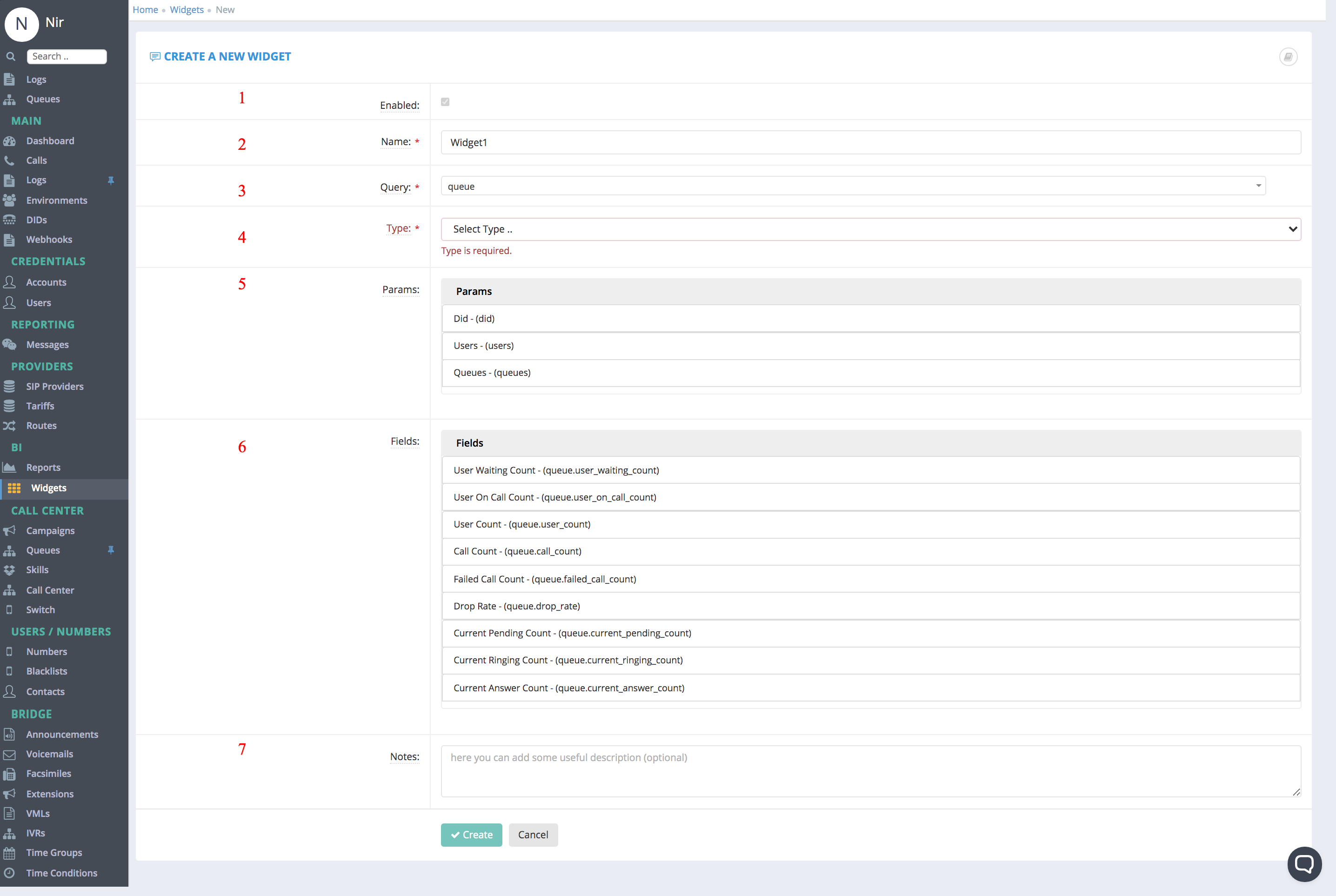
Relevant Fields:
These are the fields need to filled in order to Create a DID
Note that most fields are pre-configured and should not be changed.
- Enabled - Either the Widget is enabled/disabled
- Name – the name of the Widget (preferably use a meaningful name)
- Query - Query represent the the engine that will generate our metrics (fields) we will show , for example:
- queue - will expose to us Queue metrics like Average Answer Rate
- user- will expose to us User metrics like Average Answer Rate
- Type - how to represent the data for the end user: can be either Table/Counter or Pie (More types are coming)
- Params - Based on the Query , which parameters we will use to filter the Widget (For example we would like to show Metrics only from specific Uses / Queues)
- Fields - Based on the Query , which fields we will show in the DashBoard
-
Notes:
Comments
0 comments
Please sign in to leave a comment.