
Environment is a building block of the voipappz platform.
In A General form environment defines a Tenant (customer) and all the Resources and Objects are belongs to envionment (Calls, Extension IVR etc) for Segmentation and security reason
so each time you will create an additional resource (Extension, IVR , Announcement) or if you wish to manage existing resources, you will have to work within the Environment of the customer
-
Main Table :
In this table we List all the Available Environments that are manageable by the current account.
Please Note that we can create Account with specific Environment for custom needs.
You can display the Date when the Environment were created, if it’s enabled or not and its name.
The last column contains actions for managing the Environment.
List Environments: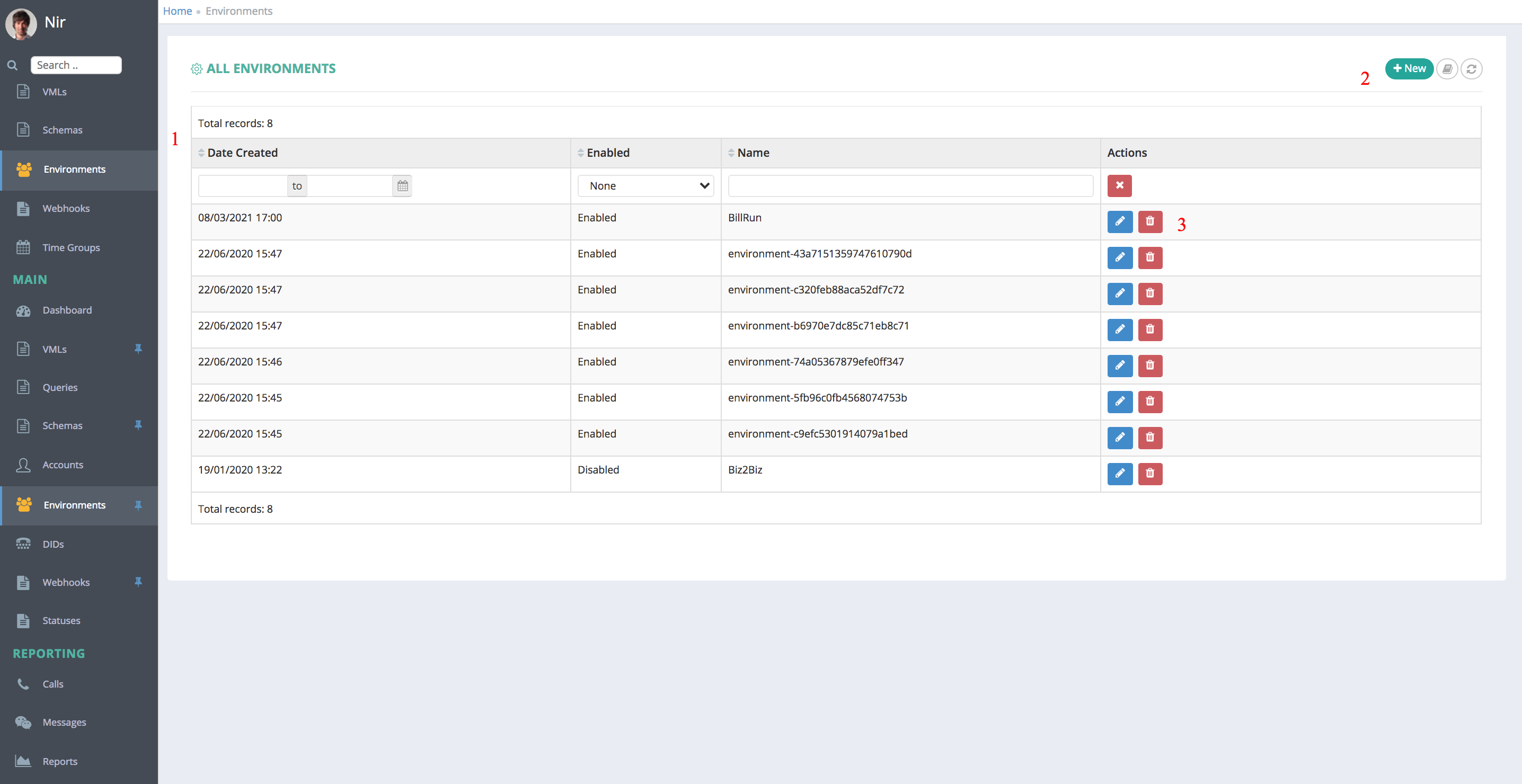
In this table all of the Environment that are manageable by the current Account user will be listed
1. Table Columns:
- Date Created - Date when the Environment were created;
- Environment - Enabled/Disabled;
- Name - Environment Name;
- Actions - The last column will be actions you can use to manage/edit the Environment,
2. On the top-right corner the “+New” icon is used to create new Environments. Also the "refresh" icon will reload the table.
3. Actions -
Clicking on the pencil icon ->>> will open the editing page for this Environment.
Clicking on the bin icon ->>> will delete the Environment.
-
New Environment :
Clicking on the “+New” button will refer you to the page where you can create a new Environment

Relevant Fields:
These are the fields need to filled on order to Create.
Note that most fields are pre-configured and should not be changed.
- Enabled - yes if checkbox is ticked
- Name – the name of the environment (preferably customer’s name or a meaningful name)
- Profile - note that most values should not be changed
Key Value Audio Level Read 1Audio Level Write 1Caller ID Number Edit - the default caller ID number that will be displayed on incoming call associated with this Environment via DIDs screenDial Timeout Default Dial Time of the Follow me / Extension Group etcDomain Language Please Select ..AfrikaansArabicBengaliTibetanBulgarianCatalanCzechWelshDanishGermanModern Greek (1453-)EnglishEstonianBasquePersianFijianFinnishFrenchIrishGujaratiHebrewHindiCroatianHungarianArmenianIndonesianIcelandicItalianJapaneseGeorgianCentral KhmerKoreanLatinLatvianLithuanianMalayalamMarathiMacedonianMalteseMongolianMaoriMalayNepaliDutchNorwegianPanjabiPolishPortugueseQuechuaRomanianRussianSlovakSlovenianSamoanSpanishAlbanianSerbianSwahiliSwedishTamilTatarTeluguThaiTonga (Tonga Islands)TurkishUkrainianUrduUzbekVietnameseXhosaChineseEnglishFreeSwitch Leg A Codecs PCMA, PCMU, OPUSFreeSwitch Leg B Codecs PCMA, PCMU, OPUSProvider Prefix Edit .. if SIP connection provider is servicing a specific country or countries list them here. i.e. 972, 44, 27 etc.Route Please Select ..GagGagS3 Bucket name Edit .. the name of the "bucket" used to store any recordings for the environmentShared environments Nothing selectedSip Interface Please Select .. the switch name that associates a SIP Provider to this Environment. This will determine which SIP service provider will be associated for incoming/outgoing callskakadulogonvoipappzva2switch-2019mywayshonilpbxegress12204natanva012odricomlolkamateraPlease Select ..Tariff Please Select .. This will determine the cost/second for incoming/outgoing callsTestTestEnvironment timezone Please Select ..International Date Line WestAmerican SamoaMidway IslandHawaiiAlaskaPacific Time (US & Canada)TijuanaArizonaChihuahuaMazatlanMountain Time (US & Canada)Central AmericaCentral Time (US & Canada)GuadalajaraMexico CityMonterreySaskatchewanBogotaEastern Time (US & Canada)Indiana (East)LimaQuitoAtlantic Time (Canada)CaracasGeorgetownLa PazPuerto RicoSantiagoNewfoundlandBrasiliaBuenos AiresGreenlandMontevideoMid-AtlanticAzoresCape Verde Is.EdinburghLisbonLondonMonroviaUTCAmsterdamBelgradeBerlinBernBratislavaBrusselsBudapestCasablancaCopenhagenDublinLjubljanaMadridParisPragueRomeSarajevoSkopjeStockholmViennaWarsawWest Central AfricaZagrebZurichAthensBucharestCairoHarareHelsinkiJerusalemKaliningradKyivPretoriaRigaSofiaTallinnVilniusBaghdadIstanbulKuwaitMinskMoscowNairobiRiyadhSt. PetersburgVolgogradTehranAbu DhabiBakuMuscatSamaraTbilisiYerevanKabulEkaterinburgIslamabadKarachiTashkentChennaiKolkataMumbaiNew DelhiSri JayawardenepuraKathmanduAlmatyAstanaDhakaUrumqiRangoonBangkokHanoiJakartaKrasnoyarskNovosibirskBeijingChongqingHong KongIrkutskKuala LumpurPerthSingaporeTaipeiUlaanbaatarOsakaSapporoSeoulTokyoYakutskAdelaideDarwinBrisbaneCanberraGuamHobartMelbournePort MoresbySydneyVladivostokMagadanNew CaledoniaSolomon Is.SrednekolymskAucklandFijiKamchatkaMarshall Is.WellingtonChatham Is.Nuku'alofaSamoaTokelau Is.Jerusalemamd_break_digit 1amd_debug 1amd_noise_inter_silence 50amd_noise_max_count 3amd_noise_max_intro 1250amd_noise_min_length 120amd_ring_timeout 36amd_silent_after_intro 500amd_silent_initial 4500amd_silent_max_session 200amd_silent_threshold 256amd_analysis_time 5000Notify on new voicemail message Yes if tickedWebhooks Nothing selected .. Edit name if required4. Meta: Advanced users only - press the "+" icon to add meta keys and associated value5. Notes:
After you are done creating the Environment click the "Save" button to save it.
Notes:
- Editing an Environment is similar to creating new Environment, the same fields are there and you can edit them as required. Click the "save" button for the changes to take effect.
- The "Notes box" at the bottom is open text box were you could write anything you think will help you regarding the current Environment.
- Changing the Environment Name is not recommended since it is used throughout the system.
Comments
0 comments
Please sign in to leave a comment.