
Queues:
Queues are an advanced method for distributing inbound calls , mainly for call center needs.
By using queues and choosing the ring strategy, you will effectively distribute the incoming calls between the Call Center agents or support staff by utilizing advanced distribution methods like Rings all agents simultaneously , Rings the agent in order position starting from numbered tier for every agent.
Note that it is assumed that all required extensions have already been defined and required announcement recordings are available. Go to Announcements , Extensions for details.
Main Screen:
In this screen, all of the queues which are associated to the Admin-user will be listed.
Table Columns:
- Date and time when the Queue created
- if it’s enabled or not
- The Environment The Queue belongs to.
- The name of the Queue
- Distribution Strategy being used to process the Calls
- Action - The last column will be actions you can use to manage/edit the Extension,
Clicking on the pencil icon ->>> will open the editing page for this queue.
Clicking on the bin icon ->>> will delete the queue. Note that the extensions remain in the environment, only queuing of extensions will be deleted.
-
Main Table Screen

Edit Queue Screen
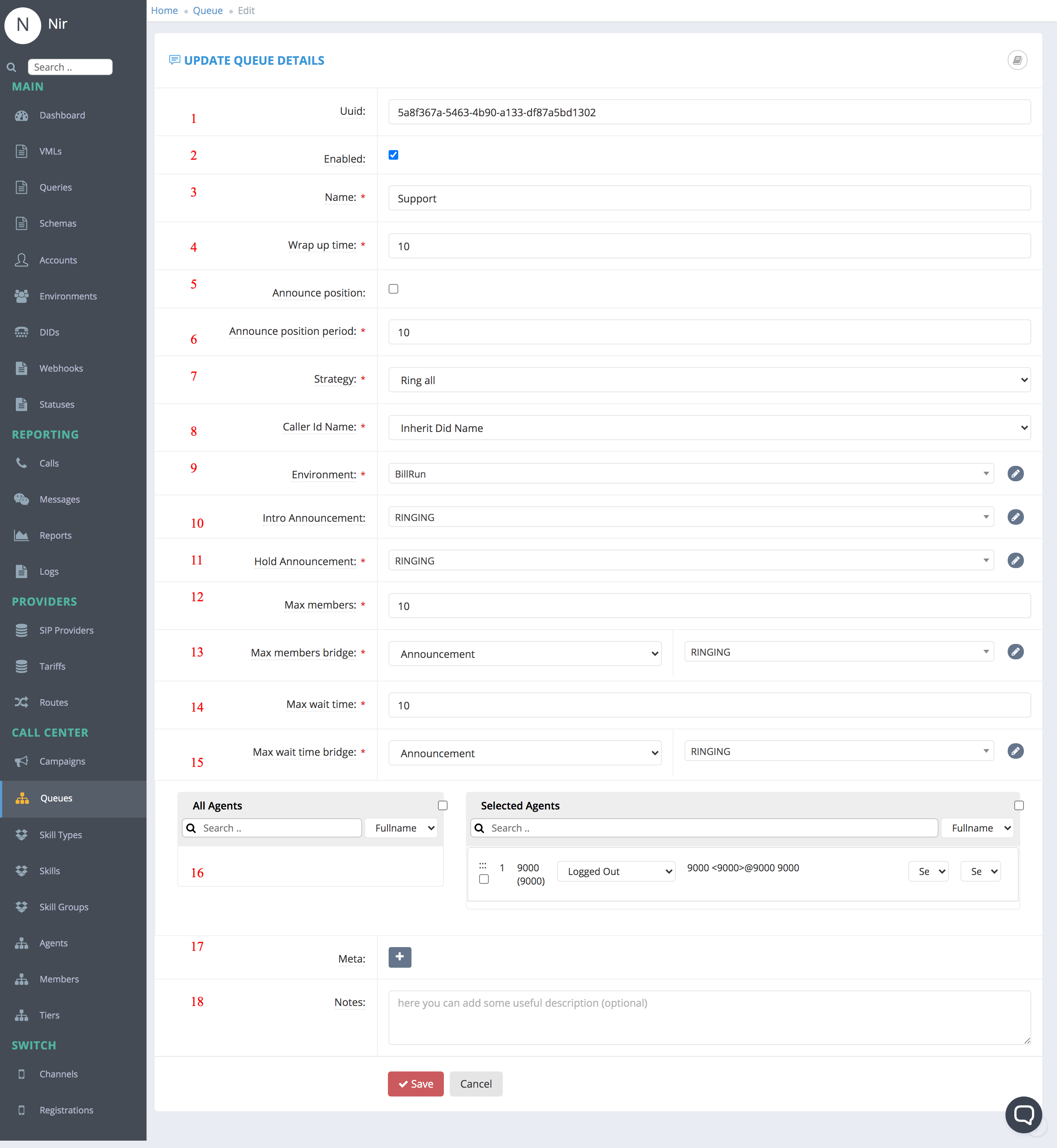
These are the fields need to filled on order to Modify
- UUID: Unique ID of the Queue
- Enabled: Resources is enabled
- Name: The Queue name
- Wrap up time: The amount of time to wait before putting the agent after hang-up back in the queue to receive another call, to allow him/her to complete notes or other tasks.
- Announce position: Method to announce to the waiting caller their position in the queue
- Announce position period: Period to play the above position message
- Strategy - The strategy defines how calls are distributed in a queue. A table of different strategies can be found below
- Caller Id Name: Inherit Did Name/Queue Name. Note that selecting DID will show the caller's number to the agent. This field is not always visible.
- Environment: – the name of the environment for the queue where it is active. All environments available to the Admin User will be listed.
- Intro Announcement: Announcement that will be played when the customer enters the Queue [Plays One Time]
- Hold Announcement: Announcement that will be played During the Calling the queue [Plays Repeatedly] - usually used for music-on-hold, repeated ring sound or commercial announcements.
- Max members: Maximum Callers on The Queue. This field is not always visible.
- Max members bridge: Bridge the Call when we reach to Maximum.
- Max Wait Time: Maximum Call Waiting
- Max Wait Time bridge: Bridge the Call when we reach to Maximum Time.
- Agents - List the Agents Tiered to to the Queue - The table on the left will list all free extensions - drag them to the right to add to the queue or to the left to remove.
- Meta- Custom Fields <<Refer to Meta>>
- Note you may need to fill the field to the right based on selected activity.
Distribution Strategy List
| String | Description |
| ring-all | Rings all agents simultaneously. |
| longest-idle-agent | Rings the agent who has been idle the longest taking into account tier level. |
| round-robin | Rings the agent in position but remember last tried agent. |
| top-down | Rings the agent in order position starting from 1 for every member. |
| agent-with-least-talk-time | Rings the agent with least talk time. |
| agent-with-fewest-calls | Rings the agent with fewest calls. |
| sequentially-by-agent-order | Rings agents sequentially by tier & order. |
| random | Rings agents in random order. |
| ring-progressively | Rings agents in the same way as top-down, but keeping the previous members ringing (it basically leads to ring-all in the end). |
Usage note. To use the queue, go to the DIDs screen, create/edit an incoming number DID and for Bridge field, select Queues. Select the name of the queue and Save.
Comments
0 comments
Please sign in to leave a comment.